
SWAYAM Registration 2026: How to Register for SWAYAM Courses, Step by Step
SWAYAM registration is free and takes about five minutes. Go to swayam.gov.in, click Sign-In / Register, and either sign in with a Google or Microsoft account or create a SWAYAM account with your name and email. Once your account is ready, open any course whose enrolment is still open and join it. Registering for the certificate exam is a separate step, done later in the course, with a fee.
This guide walks Indian students and working professionals through the full SWAYAM registration process: creating an account, completing the SWAYAM login, enrolling in a course, and filling in the exam form. It also covers the documents you need, the common mistakes that cost learners their certificate, and what to do if something goes wrong.
Quick answer: SWAYAM portal registration has three stages. (1) Create an account at swayam.gov.in (free). (2) Enrol in a course before its start date (free). (3) Register for the proctored exam if you want a certificate (paid, for example ₹1,000 per NPTEL exam in the January 2026 cycle or ₹750 per IIM Bangalore course).
Steps and screens on this page were checked on swayam.gov.in and the NPTEL exam portal on 5 November 2026. The portal changes from time to time, so treat button labels as a guide.
Table of Contents
SWAYAM Registration in 3 Stages: Account, Course, Exam
Most confusion about SWAYAM registration comes from mixing up three different things. Each stage happens at a different time and only the last one costs money.
| Stage | What it does | When | Cost |
|---|---|---|---|
| Account registration | Creates your SWAYAM login so you can use the portal | Any time | Free |
| Course enrolment | Adds a specific course to your dashboard and unlocks its videos and assignments | Before the course’s enrolment deadline | Free |
| Exam registration | Books a seat in the proctored exam that leads to a certificate | During the course, before the exam form closes | Paid (fee set by the coordinator) |
You only do account registration once. After that, every new course is just an enrolment, and every certificate is a separate exam registration.
What You Need Before SWAYAM Registration
Keep these ready before you start your SWAYAM registration:
- A working email address that you check often. Course announcements, password resets and exam admit cards arrive by email.
- A Google or Microsoft account (optional). The sign-in page lets you use either one instead of creating a separate SWAYAM password.
- Your full name exactly as on your photo ID. This matters later because your certificate and exam admit card use it.
- A mobile phone or computer with a stable internet connection. SWAYAM works in the browser, and there is an official app on Google Play.
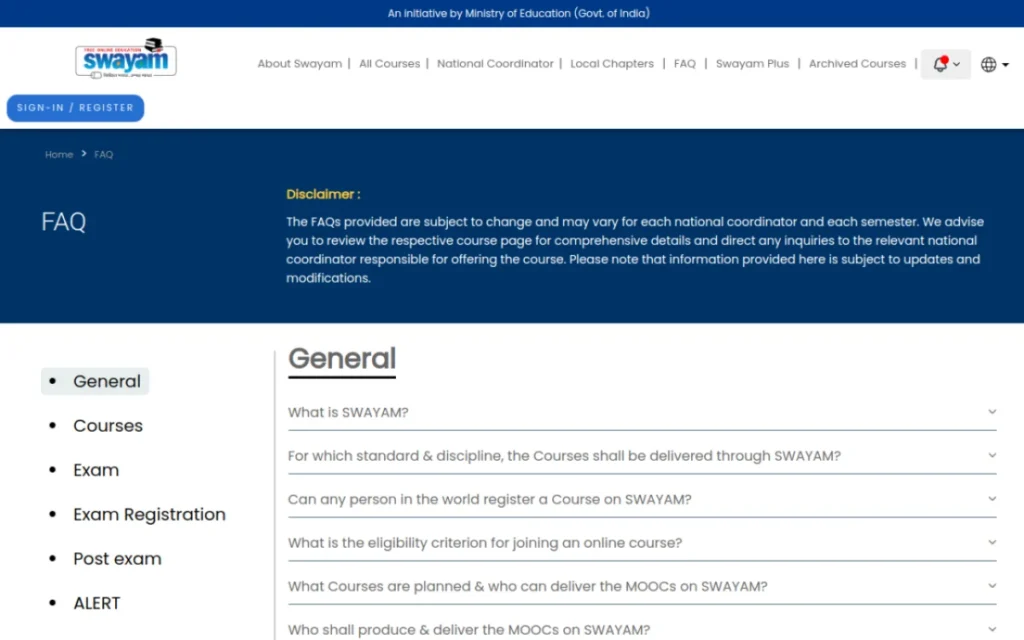
You do not need any minimum qualification to create an account. The SWAYAM FAQ says anyone can register; individual courses may still list recommended background knowledge.
How to Register on SWAYAM: 7 Easy Steps
Here is the complete SWAYAM registration process, from opening the website to sitting the exam.
Step 1: Open swayam.gov.in and click Sign-In / Register
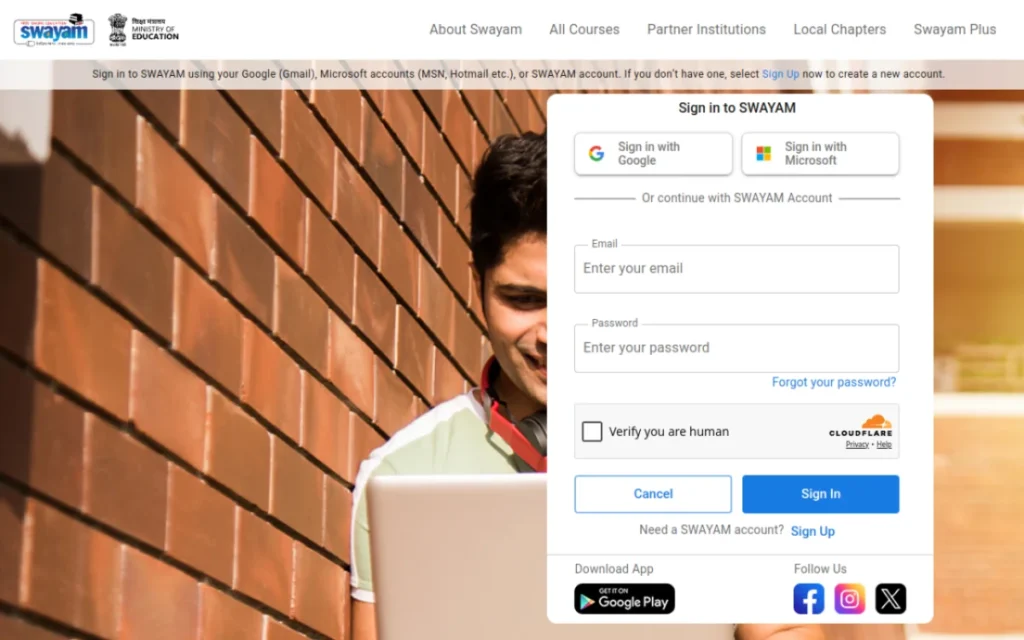
Open swayam.gov.in in your browser. The blue Sign-In / Register button sits in the top-left area of the header on desktop. On the SWAYAM app, the sign-in option appears when you first open the app.
Step 2: Choose Google, Microsoft or a SWAYAM account
The sign-in screen offers three routes. You can click Sign in with Google or Sign in with Microsoft to use an existing account, or continue with a SWAYAM account using an email and password. If you do not have a SWAYAM account yet, click Sign Up at the bottom of the form to create one. The page also runs a short “Verify you are human” check before it lets you in.
For most students, Google sign-in is the simplest choice: there is no extra password to remember, and the SWAYAM login works the same way on the app.
Step 3: Fill in your profile and register as a student
After your first SWAYAM login, the portal asks you to complete a short profile. The SWAYAM FAQ explains that you register as a student and that name and email are mandatory. Enter your name the way it appears on the ID you will carry to the exam, accept the terms and honour code, and save the profile.
Step 4: Confirm your email
SWAYAM sends account and course emails from support@swayam.gov.in. If you signed up with an email and password, look for the confirmation message and follow the link. Check your spam or promotions folder if it does not arrive within a few minutes, and add the address to your contacts so later course mails reach your inbox.
Step 5: Find a course with enrolment open
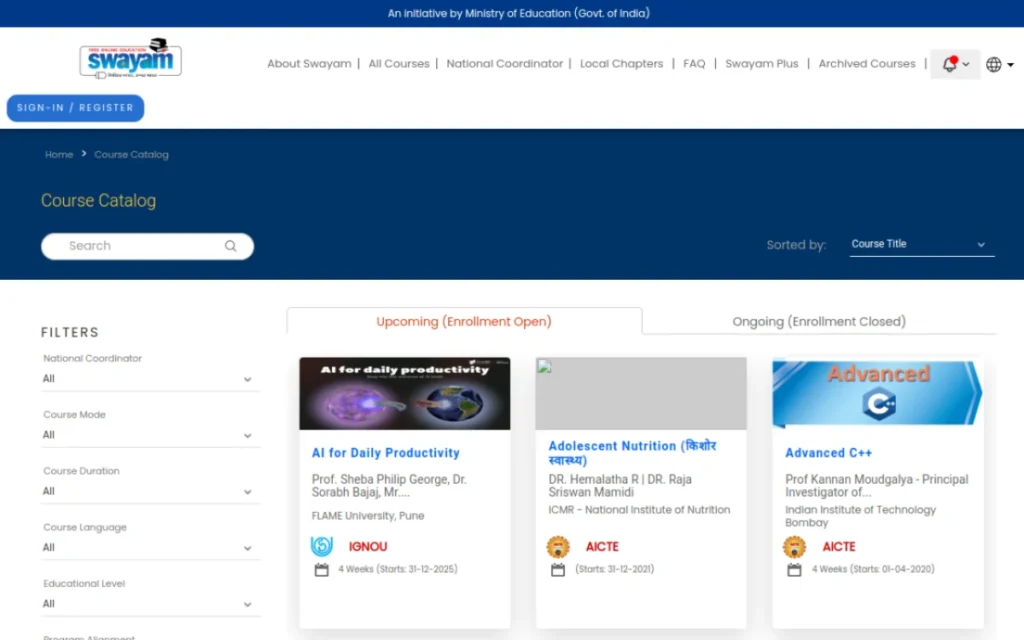
Click All Courses in the header to open the course catalogue. The catalogue has two tabs, Upcoming (Enrollment Open) and Ongoing (Enrollment Closed), plus filters for National Coordinator, course mode, duration, language and educational level. Use the search box if you already know the course name, or filter by coordinator, such as NPTEL for engineering or IIMB for management.
Step 6: Enrol in the course (free)
Open the course page and read the summary. A SWAYAM course page usually shows the duration, credit points, start and end dates, the last date to enrol and the exam date. If enrolment is open, click the button to join the course. It then appears on your dashboard, and you can watch the lectures and submit assignments as they release each week.
Step 7: Register for the exam if you want a certificate
Learning on SWAYAM is free, but a certificate needs a proctored exam. The exam form opens partway through the course. You fill it in, upload a photo, choose your preferred exam cities and pay the fee online. The next section covers the SWAYAM exam registration process in detail.
SWAYAM Exam Registration: How It Works
The exam is what turns a free course into a certificate, so it deserves extra care. Based on the SWAYAM FAQ, here is what to expect:
- One application per candidate. Submit the exam form once per course; duplicate forms are not allowed.
- Photo upload: a clear photo in JPG format between 10 KB and 200 KB.
- City choice: you list preferred exam cities and a centre is allotted in one of them. The SWAYAM FAQ mentions three choices, while NTA’s 2026 application form for SWAYAM exams asks for four preferred cities.
- Payment: online, through net banking, debit or credit cards, UPI, Paytm or wallets.
- Admit card: sent by email before the exam. Print it on A4 paper and carry it with a valid original photo ID.
- Exam rules: no negative marking, and no re-checking or re-test after results are declared.
SWAYAM exam fees in 2026
Exam fees are set by the body that conducts the exam, not by SWAYAM as a whole. NPTEL runs its own exams, while the National Testing Agency (NTA) conducts exams for most other coordinators. Two examples:
| Coordinator | Exam fee | Source |
|---|---|---|
| NPTEL (IITs and IISc) | ₹1,000 per exam (January 2026 cycle, if paid before 9 February 2026) | nptel.ac.in |
| NTA-conducted courses and IIM Bangalore courses | ₹750 for the first course (general); ₹500 for Gen-EWS, OBC (NCL), SC, ST and PwD | NTA’s SWAYAM bulletin; IIMB’s page on swayam.gov.in |
Check the course page for the current fee before you pay. Our guide to SWAYAM course fees and exam costs compares fees across coordinators in more detail.
Exam registration deadlines
Exam forms have their own deadlines, which are separate from the enrolment deadline. For example, the July 2026 semester exam registration was extended to 5 November 2026. Deadlines move from term to term, so look at the course announcements and the exam date on the course page rather than relying on last year’s dates.
How NPTEL courses are graded
For NPTEL courses on SWAYAM, the final score combines assignments and the exam, weighted 25:75. To get a certificate you need at least 40 out of 100 in assignments and at least 40 out of 100 in the exam. Missing assignments is the most common reason learners who pass the exam still miss the certificate, so submit them every week.
SWAYAM Login: Signing In After Registration
After your SWAYAM registration is complete, signing in again is simple: open swayam.gov.in, click Sign-In / Register, and use the same method you chose the first time. If you registered with Google, use Google again; if you created a SWAYAM account, enter that email and password.
A few tips for a smooth SWAYAM login:
- Stick to one method. Signing in with a different email creates a second, empty account, and your enrolled courses will seem to disappear.
- Use “Forgot your password?” on the sign-in form if you created a SWAYAM account and cannot remember the password.
- Try another browser or clear the cache if the page keeps loading, which can happen during busy enrolment periods.
- On the app, use the same email or Google account as on the website so your courses sync.
SWAYAM Registration for NPTEL Courses
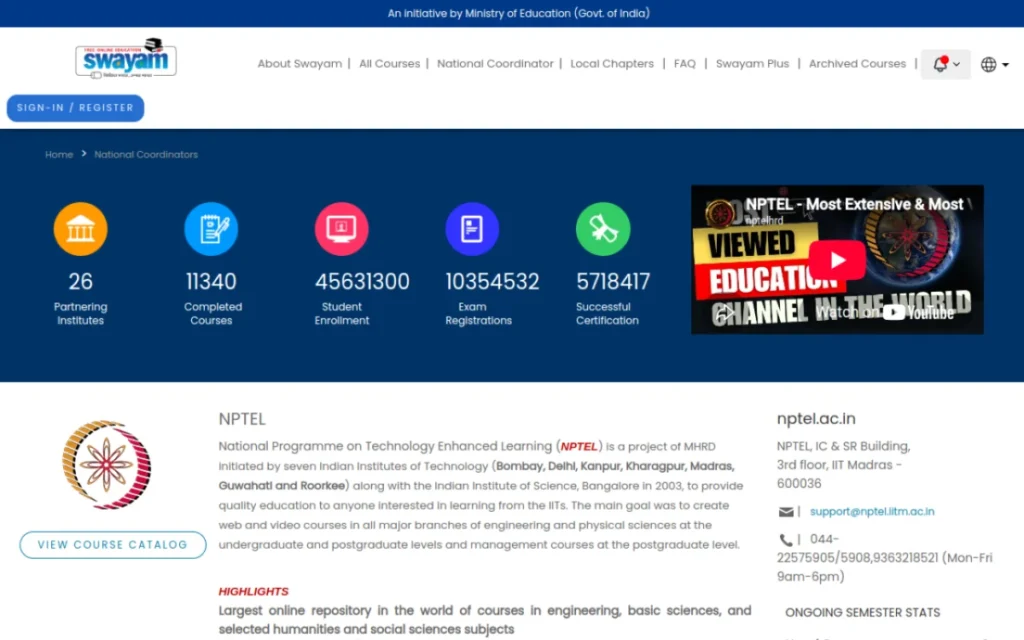
NPTEL is the National Coordinator for engineering courses on SWAYAM, and it is one of the most popular routes for Indian engineering students. Its page on SWAYAM lists 26 partnering institutes and over 1 crore exam registrations.
For NPTEL courses, the learning happens on the SWAYAM course page, while exam registration runs through the NPTEL exam portal at examform.nptel.ac.in, which uses the same SWAYAM sign-in. Use the same email or Google account you enrolled with, or the portal may not find your course.
SWAYAM Portal Registration: Tips for Indian Learners
These practical tips come from how the portal and its exams work:
- Register early in the semester. SWAYAM runs most courses in two semesters, starting around January and July. Scheduled courses cannot be joined after they start, so enrol as soon as a course you want appears under “Upcoming”.
- Use your college email only if you will keep it. Many students lose access to their college ID after graduating, and with it their SWAYAM login.
- Match your name to your ID. The name on your certificate and admit card comes from your profile.
- Plan the exam city. Choose cities you can actually travel to on the exam date, ideally with a train or bus route you know.
- Check credit transfer before you enrol. If you want academic credit, confirm with your college that it accepts the course. The About SWAYAM page refers to the UGC credit framework regulation of 2016.
- Save every email. Keep the enrolment confirmation, payment receipt and admit card in one folder until the certificate arrives.
Common SWAYAM Registration Problems and Fixes
| Problem | Likely cause | What to do |
|---|---|---|
| Course shows “Enrollment Closed” | The scheduled course has already started | Wait for the next run of the course, or look for a similar course under Upcoming |
| Courses missing after login | Signed in with a different email or method | Sign out and use the original Google, Microsoft or SWAYAM account |
| No confirmation email | Mail in spam, or a typo in the address | Check spam and promotions; add support@swayam.gov.in to contacts |
| Photo upload fails on exam form | File is not JPG or is outside 10–200 KB | Resize or compress the photo and save it as JPG |
| Page stuck on loading | Heavy traffic or browser cache | Refresh, clear the cache or try another browser |
| Self-paced course has no exam | Self-paced courses do not give certificates | Choose a scheduled course if you need a certificate |
If none of these solves the problem, use the SWAYAM Helpline / Support link in the footer of swayam.gov.in.
Who Should Register on SWAYAM?
SWAYAM registration makes sense for almost any Indian learner who wants free, structured courses:
- College students who want extra credits, or want to strengthen a weak subject before placements.
- Engineering students preparing for GATE or core interviews through NPTEL courses taught by IIT and IISc faculty.
- School students in Classes 9 to 12, through courses from NCERT and NIOS.
- Working professionals looking for free courses in management, data, programming or communication.
- Teachers who want training courses or reliable material for their own classes.
After SWAYAM Registration: What to Do Next
Once your SWAYAM registration is done, the best next step is choosing the right courses. Our What is SWAYAM guide explains how the platform and its coordinators work, and our full SWAYAM courses guide helps you find courses by subject and level.
If you are comparing free learning options more broadly, see our guides to free online courses with certificates in India and free AI courses. Learnmango also lists verified online coaches across many niches if you want one-to-one guidance alongside free courses.
Frequently Asked Questions
How do I register for SWAYAM?
Go to swayam.gov.in and click Sign-In / Register. Sign in with a Google or Microsoft account, or click Sign Up to create a SWAYAM account with your name and email. Complete your profile as a student, then open a course with enrolment open and join it.
Is SWAYAM registration free?
Yes. Creating a SWAYAM account and enrolling in courses is free. You pay only if you register for the proctored exam to get a certificate, for example ₹1,000 per NPTEL exam in the January 2026 cycle or ₹750 per IIM Bangalore course.
What documents are needed for SWAYAM registration?
None for creating an account; only your name and a valid email are mandatory. For exam registration you need a JPG photo between 10 KB and 200 KB, and on exam day you must carry the A4 printout of your admit card and an original photo ID.
Can I use my Google account for SWAYAM login?
Yes. The SWAYAM sign-in page has Sign in with Google and Sign in with Microsoft buttons, so you can register and log in without creating a separate SWAYAM password.
Can I join a SWAYAM course after it has started?
No. The SWAYAM FAQ says you cannot enrol in a scheduled course after it starts. Such courses move to the Ongoing (Enrollment Closed) tab. Look for the next run of the course or a similar course under Upcoming.
What is the difference between SWAYAM registration and exam registration?
SWAYAM registration creates your account and is free. Exam registration is a separate, paid form for each course, filled in partway through the course, that books your seat in a proctored exam for the certificate.
How many exam cities can I choose in SWAYAM exam registration?
You list preferred exam cities on the form and a centre is allotted in one of them. The SWAYAM FAQ mentions three choices, while NTA’s 2026 SWAYAM exam form asks for four. The admit card with your centre details is sent by email before the exam.
How do I pay the SWAYAM exam fee?
The fee is paid online while filling in the exam form. The SWAYAM FAQ lists net banking, debit and credit cards, UPI, Paytm and wallets as payment options.
Is there an age limit for SWAYAM registration?
The SWAYAM FAQ says anyone can register for a course on SWAYAM. Courses range from Class 9 to postgraduate level, so pick courses that match your level.
Why can’t I see my courses after SWAYAM login?
You have most likely signed in with a different email or method from the one you enrolled with. Sign out and log in with the original Google, Microsoft or SWAYAM account.
Do self-paced SWAYAM courses give a certificate?
No. According to the SWAYAM FAQ, self-paced courses do not lead to a certificate. Choose a scheduled course with an exam if you need one.
Is there a SWAYAM app for registration?
Yes. SWAYAM has an official app on Google Play. You can register, sign in and study on the app using the same account as the website.
Key Takeaways
- SWAYAM registration is free: sign in with Google or Microsoft, or create a SWAYAM account with your name and email at swayam.gov.in.
- Registration has three stages: account (free), course enrolment (free, before the course starts) and exam registration (paid).
- Exam fees are set by each coordinator, such as ₹1,000 per NPTEL exam in the January 2026 cycle or ₹750 per IIM Bangalore course.
- The exam form needs a JPG photo of 10–200 KB, a choice of preferred exam cities and online payment; carry the admit card and photo ID on exam day.
- Use the same SWAYAM login every time, and submit weekly assignments, because NPTEL certificates need 40/100 in both assignments and the exam.
Facts were checked on swayam.gov.in and nptel.ac.in on 5 November 2026. Learnmango is an independent guide and is not affiliated with SWAYAM or the Ministry of Education.